
Every successful property transaction centers on one foundational legal instrument: the Residential Real Estate Purchase Agreement (also known as a Purchase and Sale Agreement or Contract of Sale). Whether you are a real estate agent submitting an urgent purchase offer, a brokerage managing multi-million-dollar closing pipelines, a real estate attorney coordinating escrow requirements, or a real estate investor acquiring multi-unit properties, drafting an airtight purchase agreement is your most critical responsibility. The contract legally codifies the final purchase price, earnest money deposit terms, bank financing arrangements, title insurance obligations, inspection deadlines, appraisal contingencies, and statutory property disclosures.
Yet in competitive property markets, manual contract preparation is an exhausting operational hazard. Cloning previous purchase agreements, manually retyping buyer names, legal property descriptions, tax parcel numbers (APNs), and financing terms in Microsoft Word or Google Docs invites human error, contradictory deadlines, and severe financial liability. In this comprehensive guide, you will learn how to turn transaction records in Google Sheets into customized, legally robust, ready-to-sign Residential Real Estate Purchase Agreements in Google Docs in seconds using Foldernest and its free, pre-built Residential Real Estate Purchase Agreement starter template.
The High Stakes of Manual Real Estate Contract Drafting
Real estate transactions involve substantial financial commitments, strict contractual timelines, and strict statutory disclosure duties. Traditional manual drafting or rudimentary mail-merge plugins introduce perilous risks into the deal:
- Catastrophic Data Bleed & Residual Disclosures: Cloning an existing deal's agreement risks leaving the previous buyer's name, old earnest money escrow details, confidential counter-offer terms, or unrelated lead-based paint disclosures in the new contract.
- Financing & Appraisal Contingency Clashes: Financing conditions differ between conventional mortgages, FHA/VA backed loans, and all-cash offers. Manually altering these clauses often results in contradictory language regarding lender commitment deadlines, appraisal shortfall renegotiation windows, or loan commitment termination rights.
- Critical Title & Escrow Deadline Misses: Real estate contracts rely on strict 'time is of the essence' deadlines for title defect notices, objection remedies, inspection reviews, and earnest money deposits. Typographical errors in deadline dates can cause buyers to unwittingly forfeit deposits or lose their legal right to cancel.
- Broken Document Layouts & Awkward Blanks: Manually deleting non-applicable clauses—such as contingencies for the sale of the buyer's prior home or seller credits—leaves unsightly blank spaces, broken clause numbering, and orphaned headings that erode client confidence and trigger escrow disputes.
The Modern Solution: Smart Spreadsheets + Conditional Docs
Foldernest bridges the gap between spreadsheet-based transaction tracking and professional legal documentation. By pairing Google Sheets with dynamic variable markers (`{{Field Name}}`) and smart conditional logic (`<<If: ...>>...<<EndIf>>`), Foldernest allows you to generate flawless contracts automatically:
- Structured Deal Taxonomy: Keep buyer and seller identities, property descriptions, legal tax parcels, purchase figures, escrow agents, and timelines cleanly organized across 63 standardized columns.
- Built-In Dropdown Validations: Standardize transaction terms with native Google Sheets dropdowns for *Property type*, *Earnest money trust account*, *Financing type*, *Bank financing loan type*, *Closing costs responsibility*, *Appraisal contingency*, and *Disclosures option*.
- Adaptive Conditional Clauses: Bank financing requirements, cash verification letters, seller credits, title objections, and attached disclosure addenda compile dynamically. If a buyer submits an all-cash offer or waives the appraisal contingency, Foldernest cleanly purges the irrelevant clauses—leaving no blank gaps.
- Automated Transaction Register: Every compiled Google Doc link is recorded directly back into Column BL (Generated File URL) with Google Drive Smart Chip previews for one-click access.
Step 1: Open Foldernest in Google Sheets
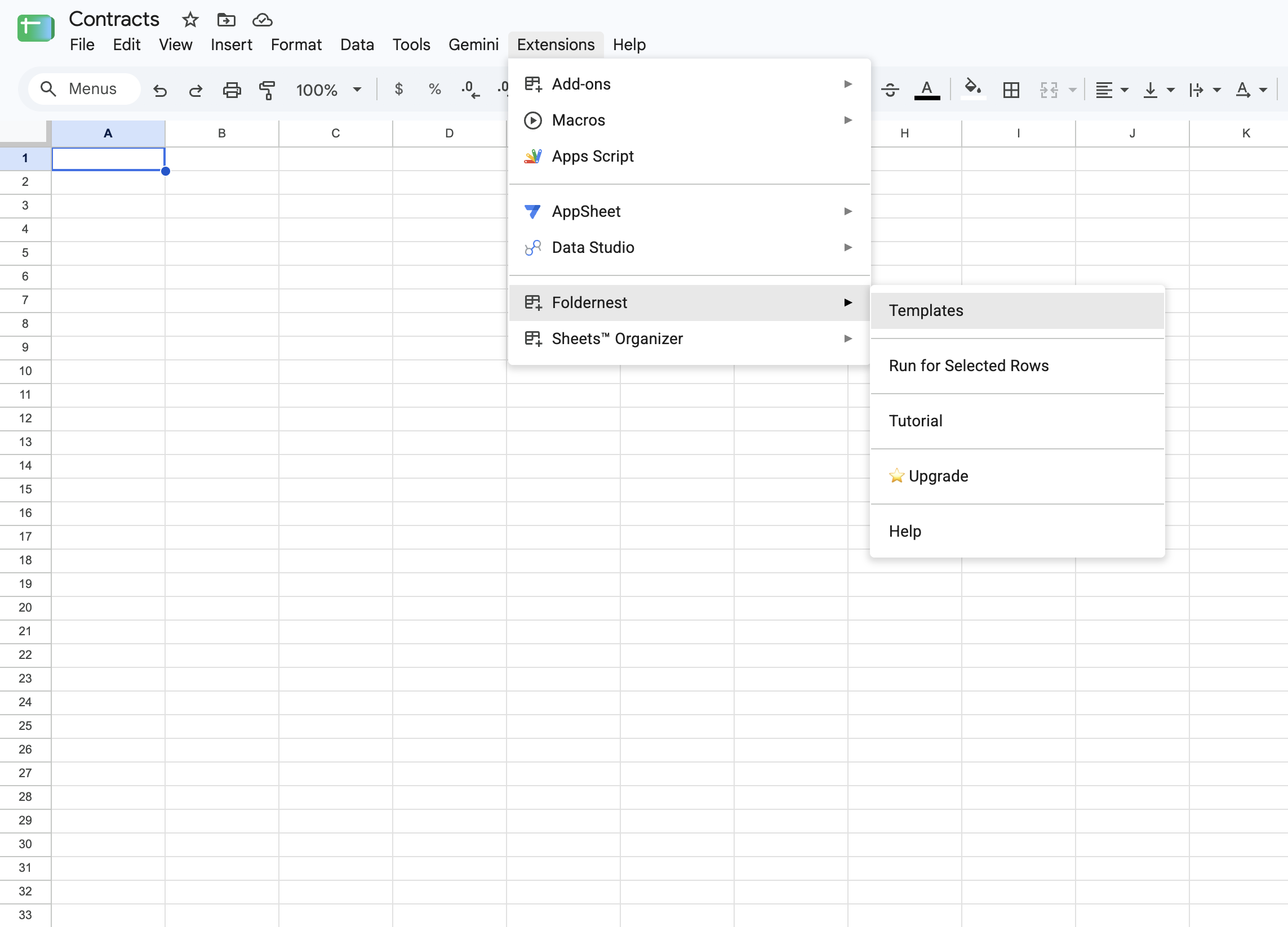
Open your Google Spreadsheet where your brokerage, acquisitions team, or escrow office tracks prospective deals and active offers. In the top navigation bar:
- 1. Click Extensions in the Google Sheets menu bar.
- 2. Select Foldernest > Document & Folder Templates (or Templates).
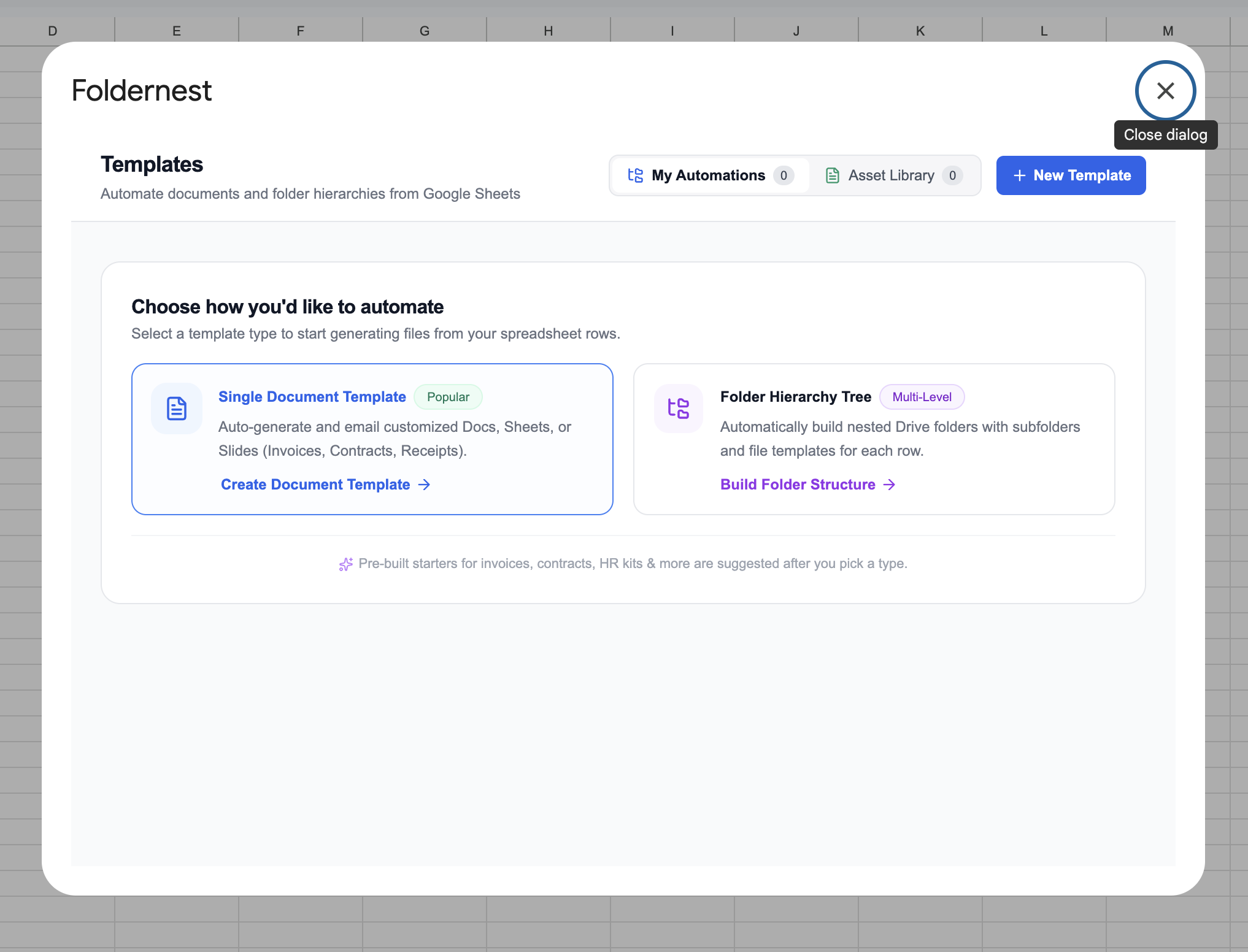
Step 2: Choose 'Single Document Template' Mode
In the Foldernest template builder modal, choose Single Document Template (highlighted as the popular option). This mode compiles each row of real estate data into an individualized, fully formatted Google Docs contract.
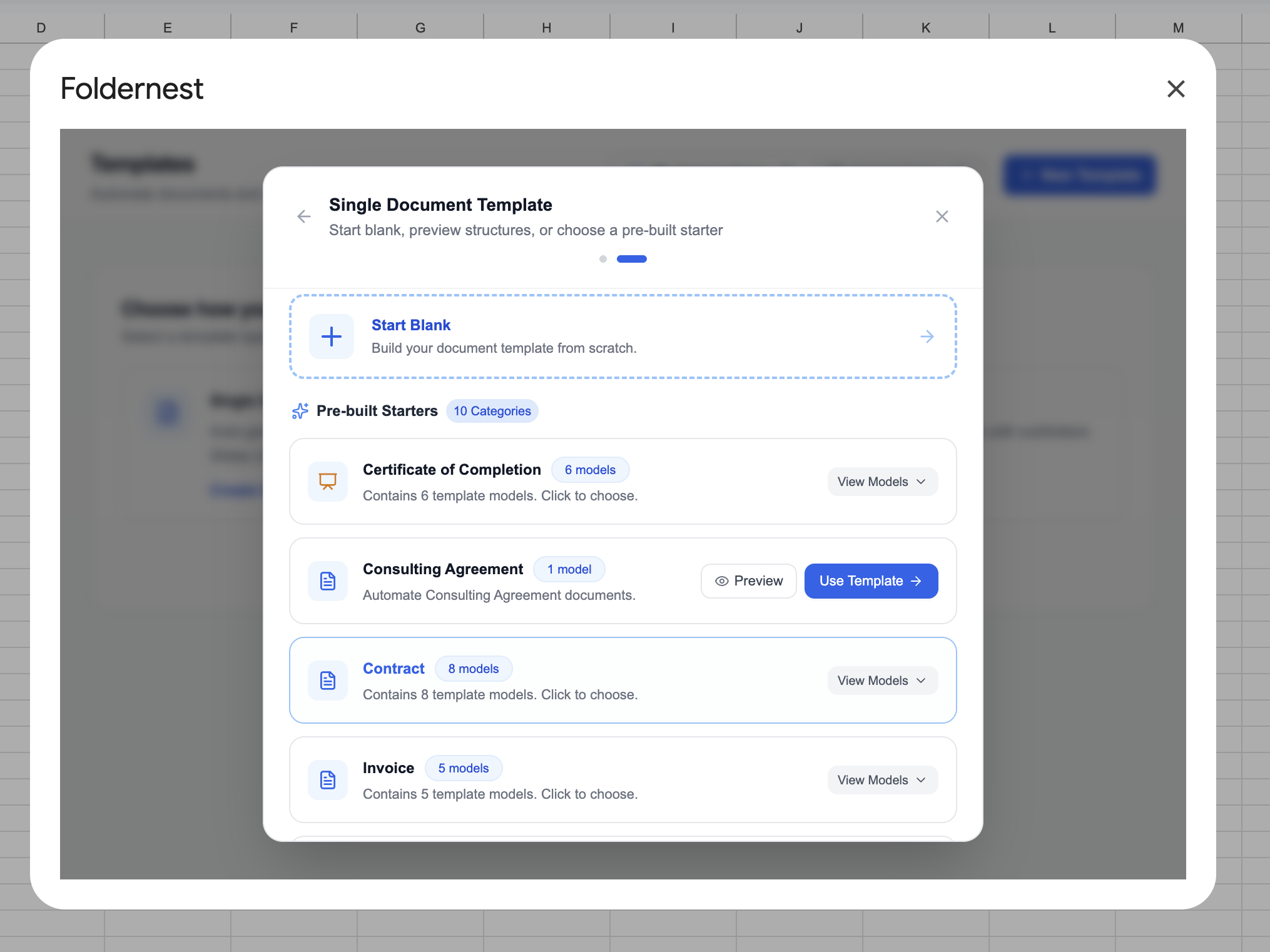
Step 3: Browse Contract Starters & Select 'Residential Real Estate Purchase Agreement'
Foldernest features an extensive catalog of pre-built business, HR, and legal starters. Browse through the available categories or expand the Contract group (containing ready-to-use agreements).
Expand the Contract category, locate Residential Real Estate Purchase Agreement (DOCS), and click Use Model.
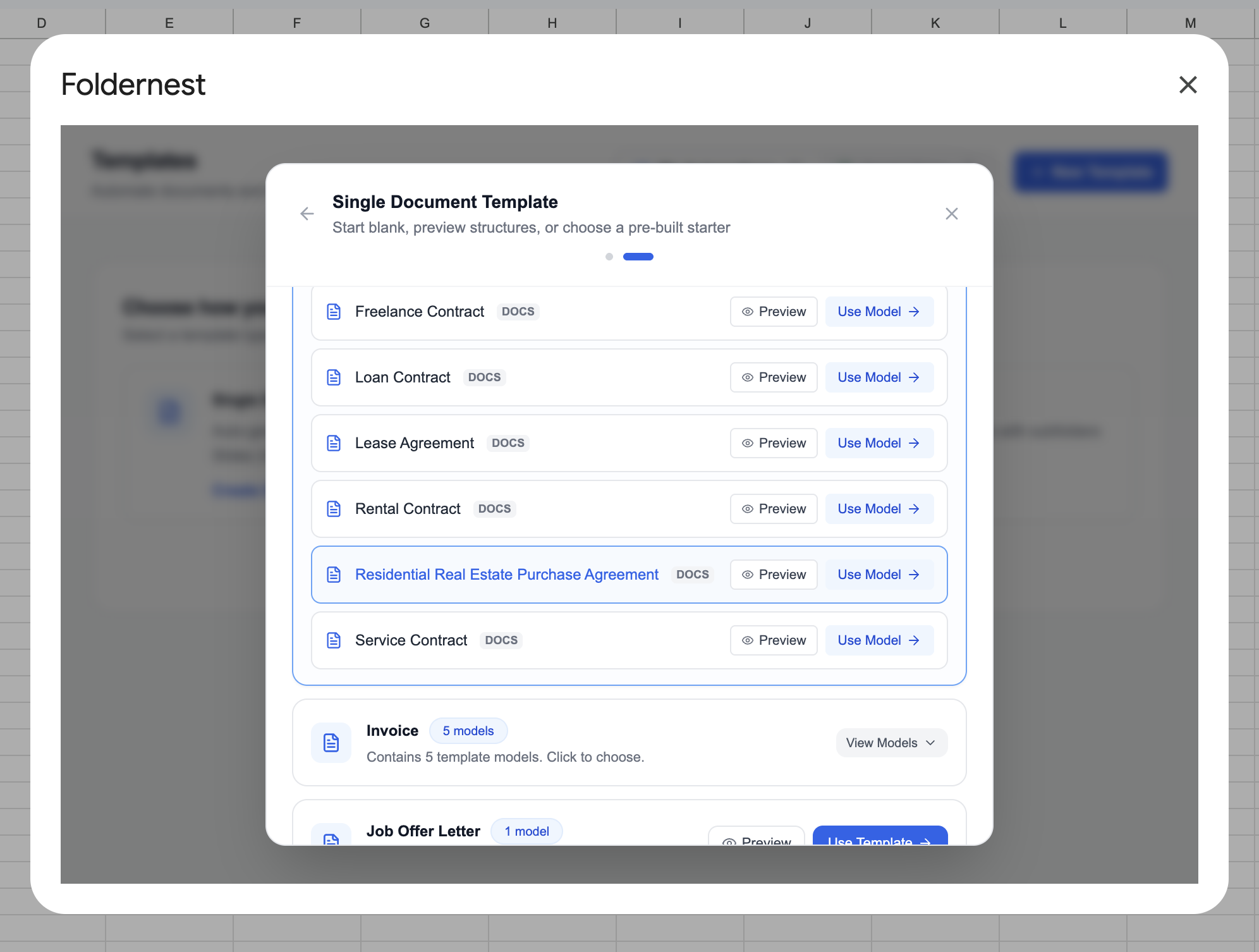
When you click Use Model, Foldernest provisions your complete workspace environment automatically in seconds:
- Creates the 'Residential Real Estate Purchase Agreement' Sheet Tab: Adds a dedicated spreadsheet tab containing 63 structured columns (from Column A through BL) encompassing buyer and seller info, property address, APN parcel details, purchase price figures, earnest money terms, financing mechanisms, closing dates, title companies, inspection deadlines, appraisal contingency clauses, and broker signatures.
- Applies Native Data Validations: Sets up in-cell dropdowns for critical legal clauses (*Property type*, *Earnest money trust account*, *Financing type*, *Bank financing loan type*, *Closing costs responsibility*, *Appraisal contingency*, *Disclosures option*) to prevent clerical errors.
- Injects Realistic Sample Deal Data: Populates Row 2 with authentic residential purchase data (*Jonathan Miller* as Buyer, *Eleanor Vance* as Seller, *1042 Ocean Avenue, Santa Monica, CA*, a purchase price of *$1,250,000.00*, and *$25,000.00* earnest money deposit).
- Provisions the Master Template: Copies the editable Residential Real Estate Purchase Agreement - Template Master Google Doc directly into your Google Drive.
Step 4: Inspect the Master Template & Conditional Logic in Google Docs
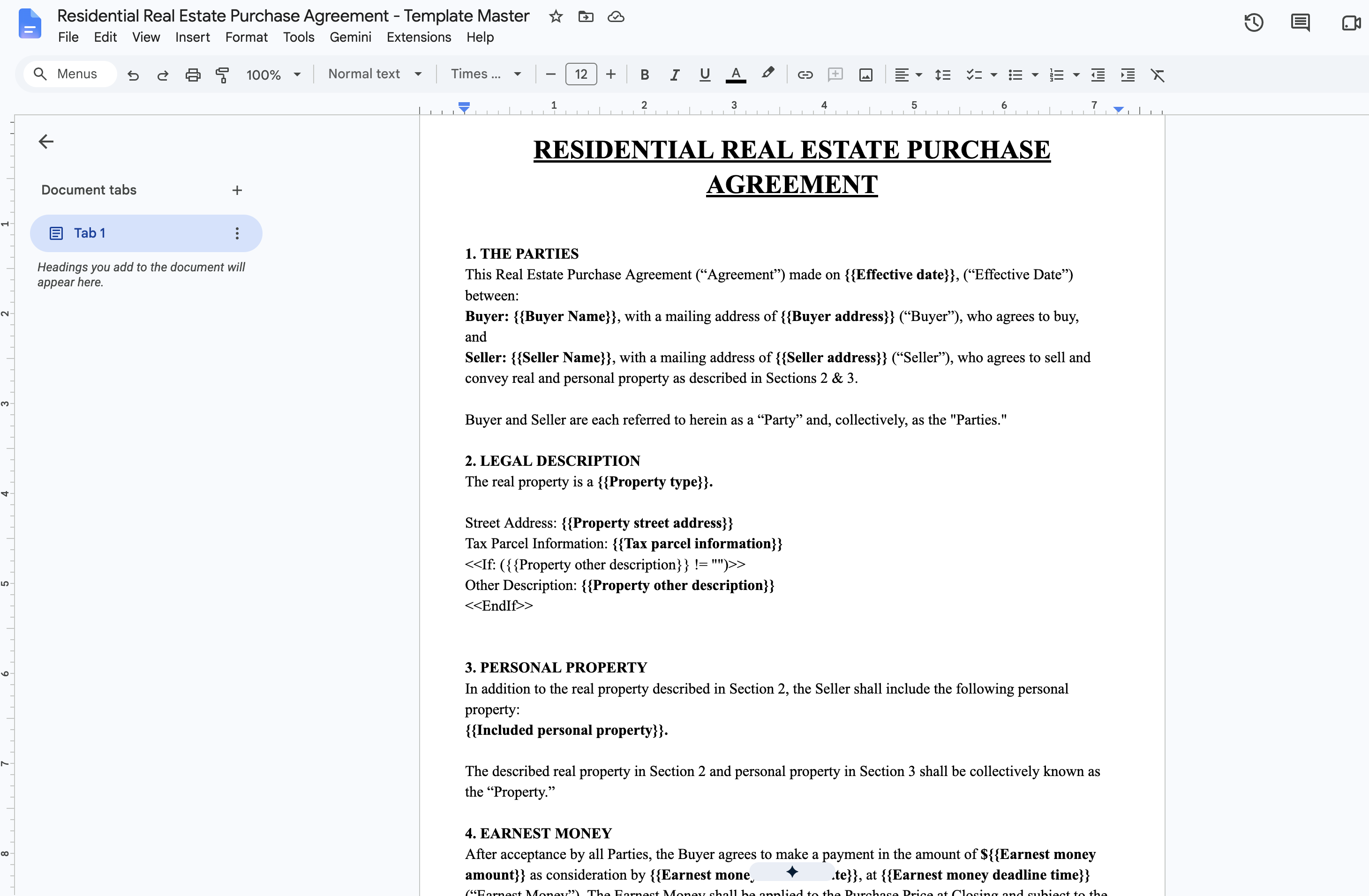
Open the newly provisioned Residential Real Estate Purchase Agreement - Template Master in Google Docs. The document is professionally formatted with formal legal provisions, article numbering, dynamic markers (`{{...}}`), and conditional statement blocks (`<<If: ...>>`):
Pro Tip
How Real Estate Conditional Logic Works: Examine Section 4 (Financing). The master template contains `<<If: ({{Financing type}} = "Bank Financing")>>...<<EndIf>>` containing conventional, FHA, and VA loan clauses, alongside `<<If: ({{Financing type}} = "All Cash Offer")>>...<<EndIf>>` for cash transactions requiring proof of funds. When Foldernest compiles your document, it evaluates your spreadsheet row and prints only the relevant provisions—eradicating non-applicable clauses without leaving orphaned headings or blank lines.
Key dynamic variables and conditional clauses pre-engineered into the purchase agreement master include:
- The Parties & Legal Property Description: `{{Effective date}}`, `{{Buyer Name}}`, `{{Buyer address}}`, `{{Seller Name}}`, `{{Seller address}}`, `{{Property street address}}`, `{{Tax parcel information}}`, and `{{Included personal property}}`.
- Purchase Price & Earnest Money: `{{Purchase price amount in words}}`, `{{Purchase price amount}}`, `{{Earnest money amount}}`, `{{Earnest money deadline date}}`, `{{Earnest money deadline time}}`, and `{{Earnest money trust account}}`.
- Financing Mechanisms: Dynamically switches between Bank Financing (conventional, FHA, VA) and All Cash Offer (cash verification deadlines).
- Title, Escrow & Closing: `{{Closing date}}`, `{{Closing time}}`, `{{Title company name and office}}`, `{{Title defect remedy days}}`, `{{Title report objection days}}`, and `{{Closing costs responsibility}}`.
- Contingencies & Disclosures: Evaluates appraisal contingencies, inspection turnaround deadlines, prior home sale contingencies, and statutory disclosure schedules (`{{Attached disclosures list}}`).
- Broker & Party Execution: `{{Buyer print name}}`, `{{Buyer signing date}}`, `{{Seller print name}}`, `{{Seller signing date}}`, `{{Agent print name}}`, and `{{Agent signing date}}`.
Step 5: Configure Model & Source Sheet in Foldernest
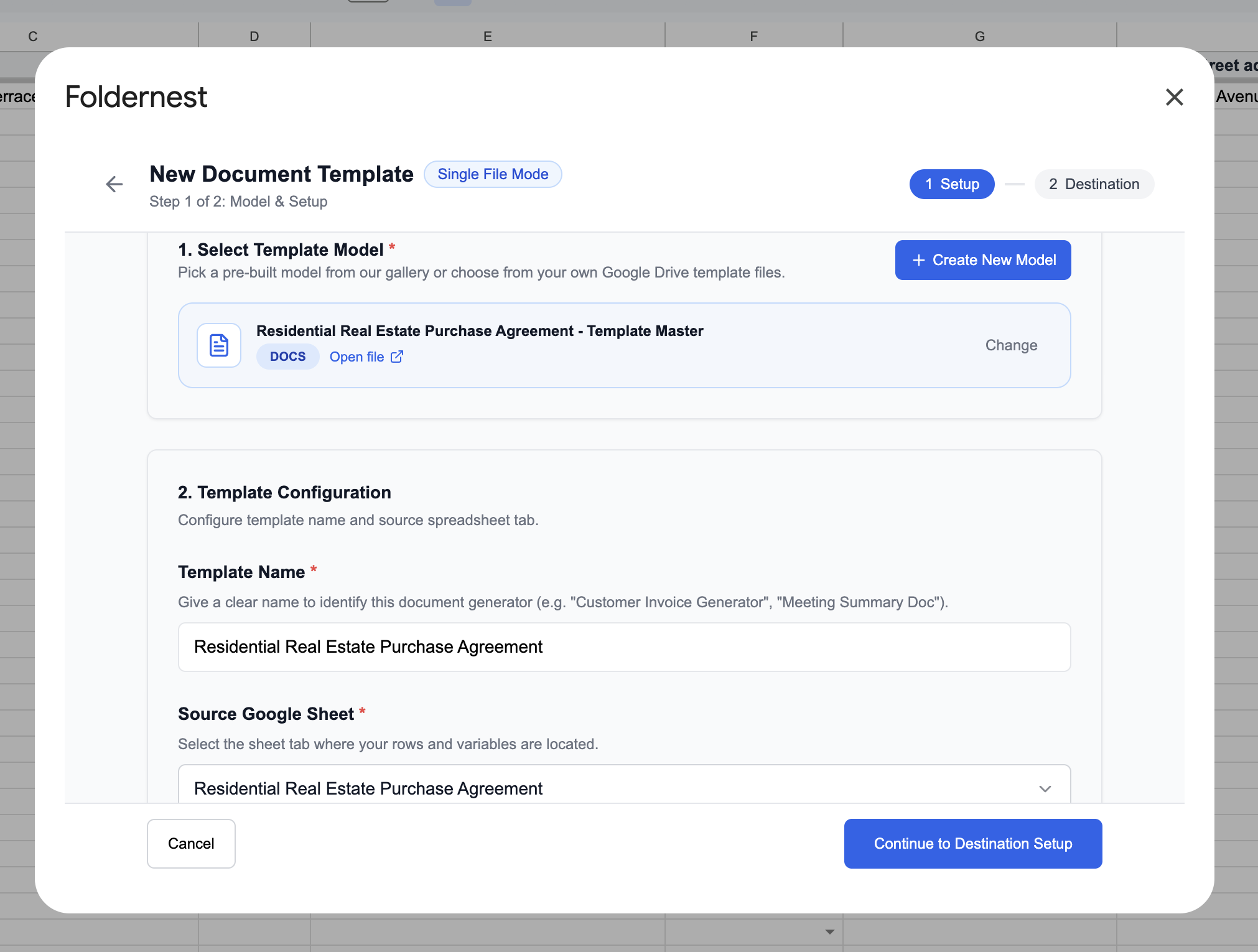
Return to the Foldernest setup modal (Step 1 of 2: Model & Setup). The provisioned Residential Real Estate Purchase Agreement - Template Master Google Doc is automatically selected. Confirm the Template Name (set to *Residential Real Estate Purchase Agreement*) and ensure that the Source Google Sheet points to the Residential Real Estate Purchase Agreement tab.
Step 6: Select Document Generation Triggers
Scroll down in Step 1 to choose when real estate purchase agreements are generated:
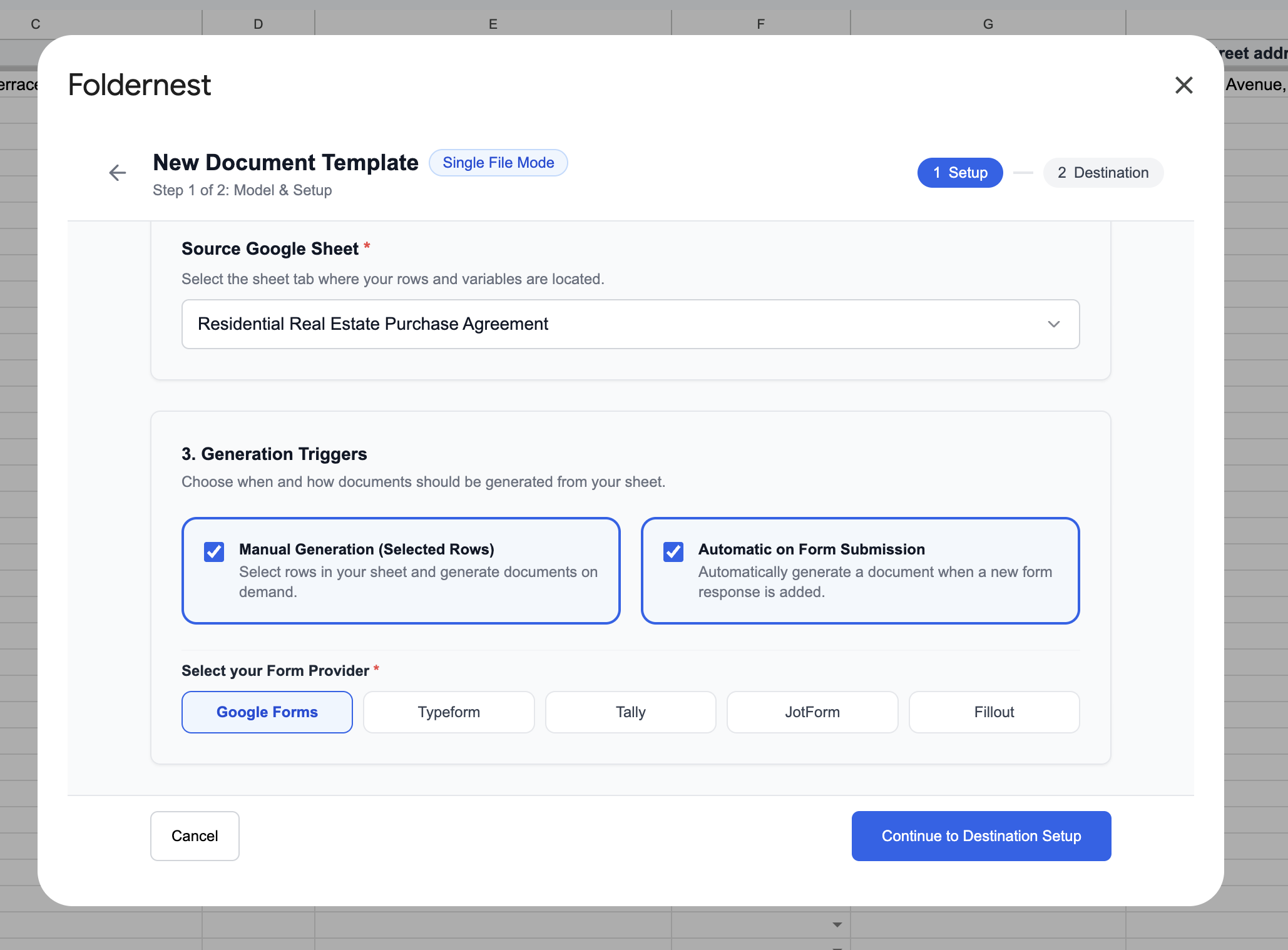
- Manual Generation (Default): Generate agreements on demand by selecting rows or clicking Run in the Foldernest dashboard—ideal for agents carefully reviewing offer details prior to compilation.
- On Column Edit: Automatically generate the agreement when a status column changes (e.g. when an acquisition manager marks an offer row as *'Approved to Draft'*).
- On Google Form Submission: Ideal for buyer intake questionnaires or broker portal submissions that log incoming transaction data directly into Google Sheets.
Click Next to proceed to Step 2.
Step 7: Configure Dynamic Naming & Destination Folder
In Step 2 of 2: Generation Setup, define how generated purchase agreements are named and where they are archived in Google Drive:
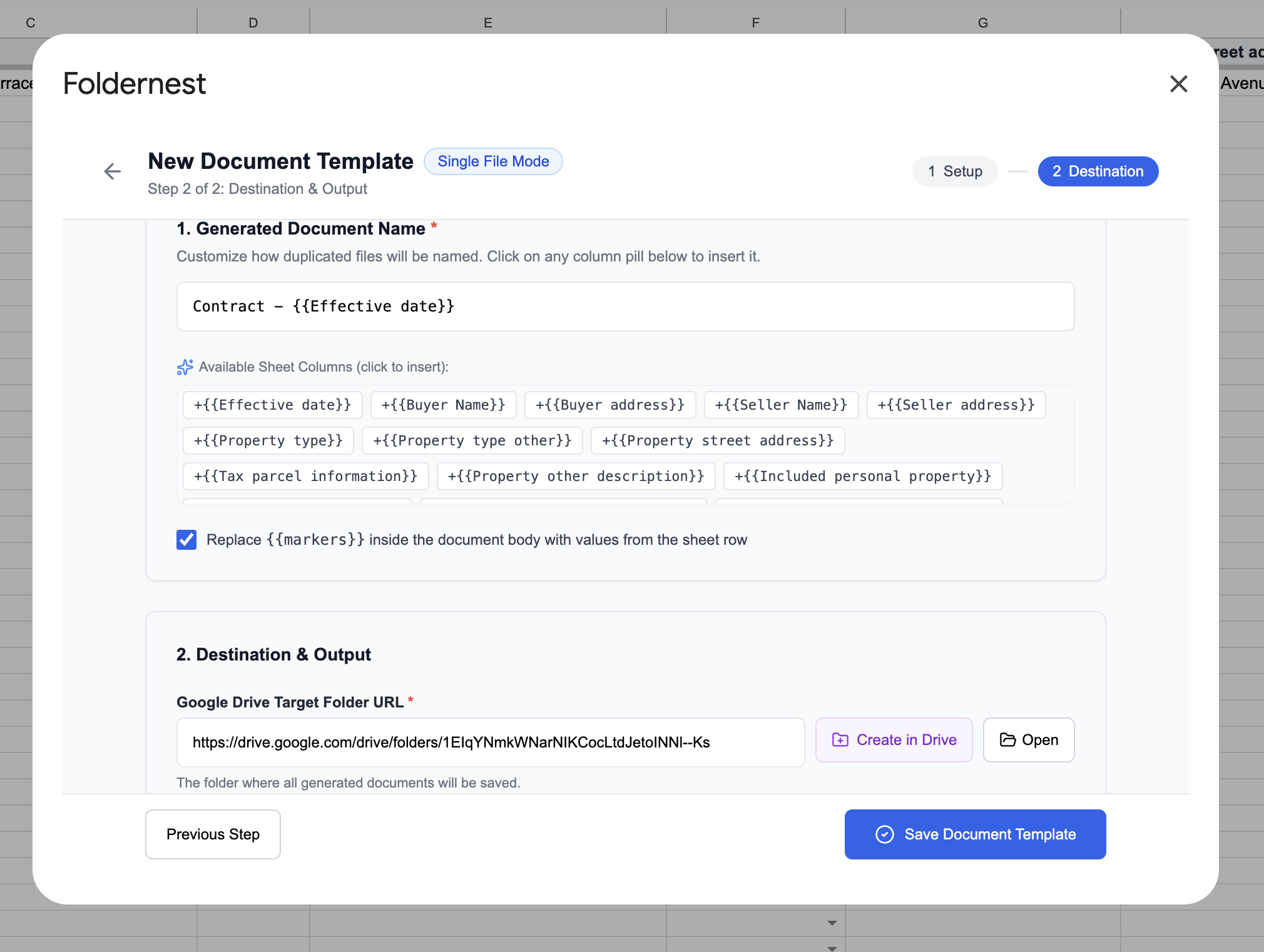
- Generated Document Name: Use dynamic markers to build standardized, easily searchable file titles such as `Purchase_Agreement_{{Buyer Name}}_{{Property street address}}` or `PSA - {{Property street address}} - {{Buyer Name}}`.
- Destination Google Drive Folder: Foldernest automatically provisions a dedicated destination folder named `Residential Real Estate Purchase Agreement Documents`. You can keep this folder or select any team shared drive or transaction repository.
- Export as PDF: Toggle this option on if you wish to generate immutable PDF contracts alongside editable Google Docs for immediate client distribution.
Step 8: Set Generated File URL Column & Inspect Available Markers
Under the Generated File URL Column field, Foldernest pre-selects Column BL (Generated File URL). When each contract is generated, its direct Google Drive link will be logged into this column.
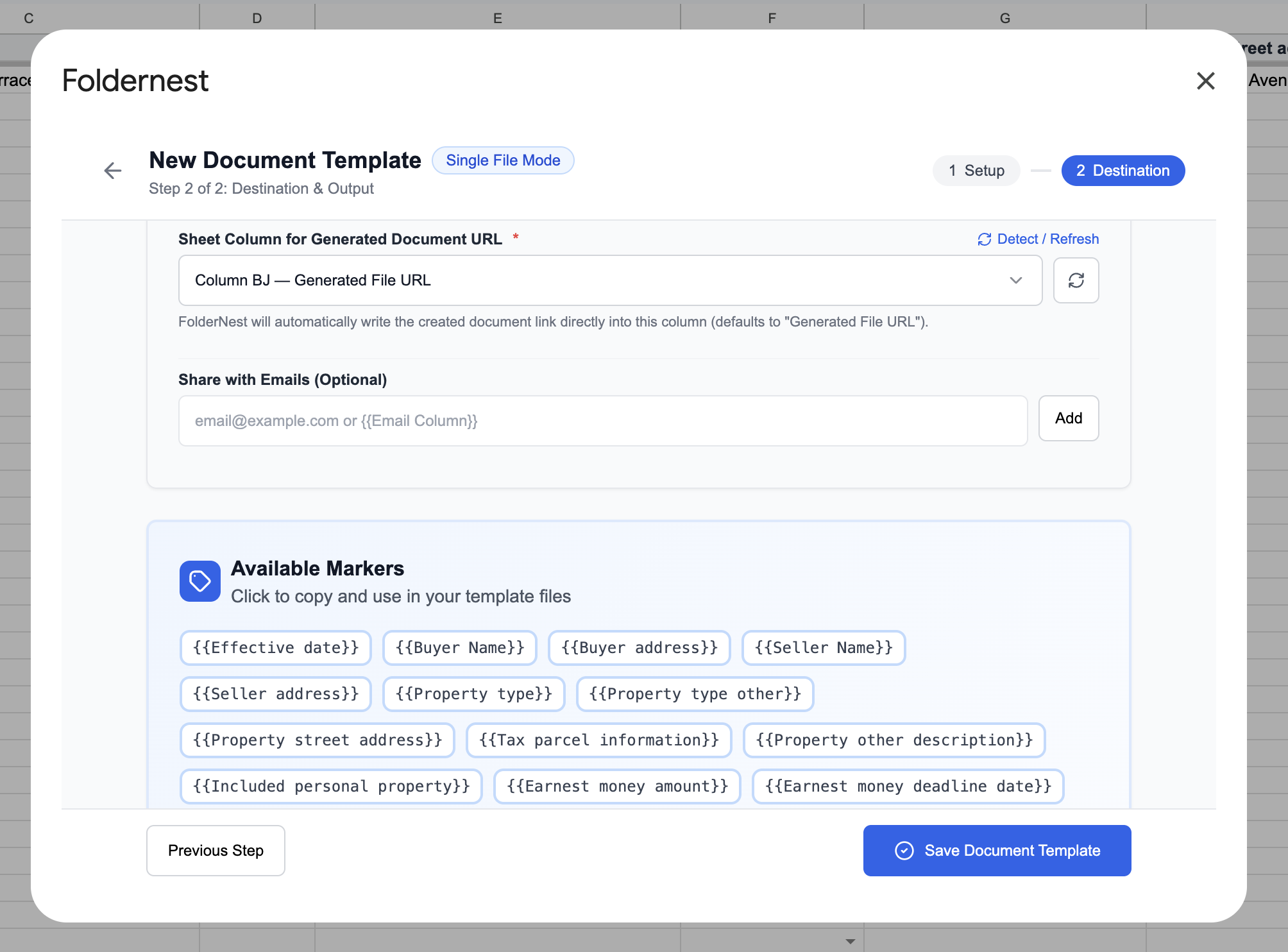
Pro Tip
Quick-Access Marker Explorer: Need to double-check available variables or add custom clauses to your purchase agreement? Click the Available Markers button located next to the URL column selector. A floating badge inventory displays all detected columns across your sheet (e.g. `{{Buyer Name}}`, `{{Purchase price amount}}`, `{{Closing date}}`, `{{Appraisal contingency}}`). Click any marker to copy it directly to your clipboard.
Click Save Automation to finalize your setup.
Step 9: Test Your Automation on Sample Row 2
Once saved, Foldernest displays the Save & Test confirmation screen. Testing against Row 2 allows you to verify variable substitution and conditional formatting before rolling out the automation across live transaction pipelines.
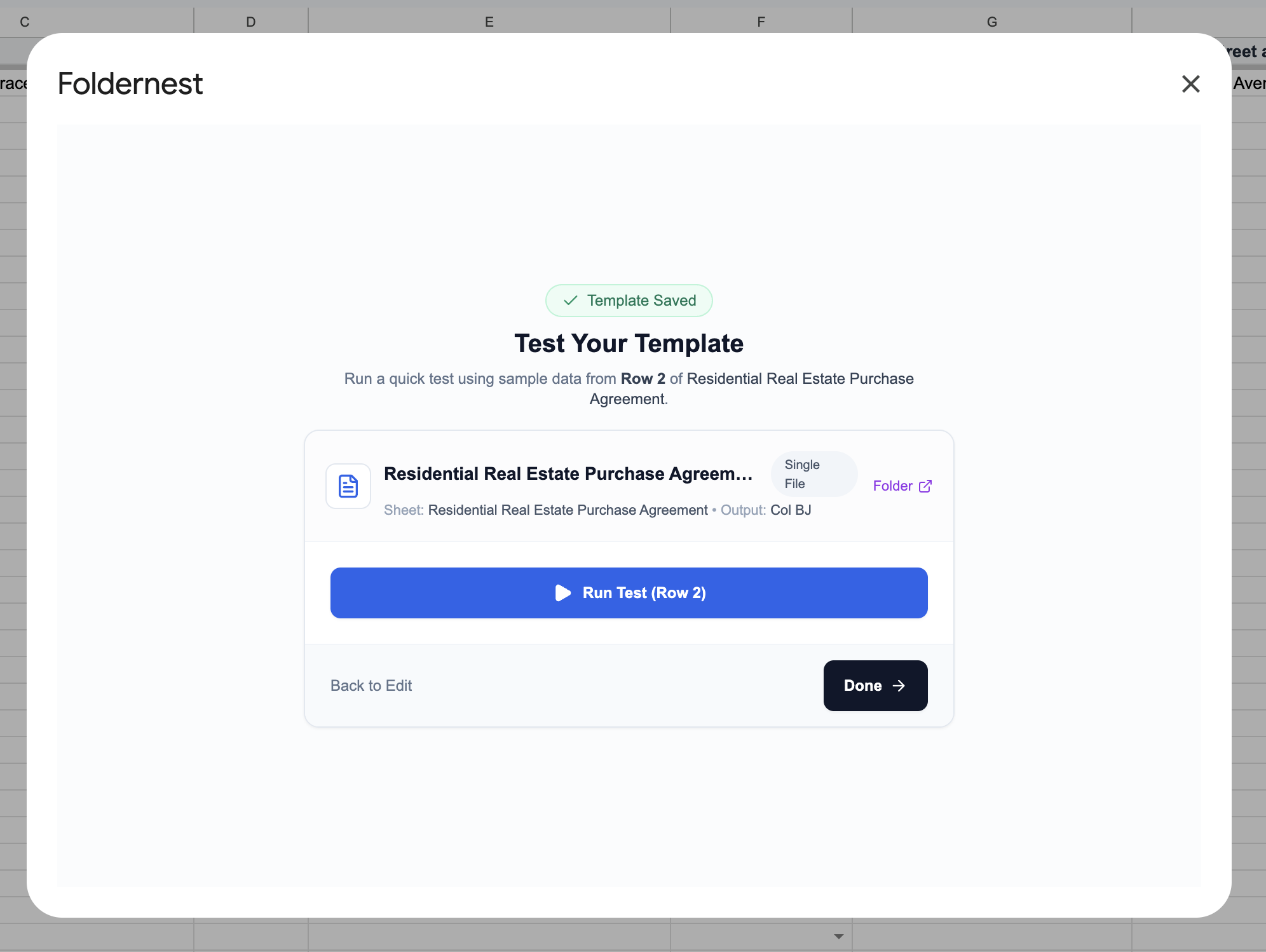
Review the preview metrics (Buyer: *Jonathan Miller*, Seller: *Eleanor Vance*, Address: *1042 Ocean Avenue, Santa Monica, CA*, Price: *$1,250,000.00*) and click Test Template.
Step 10: Verify Generation Success Notification
Foldernest executes the generation pipeline in less than three seconds. The modal updates to confirm success, displaying the created document title and direct action links:
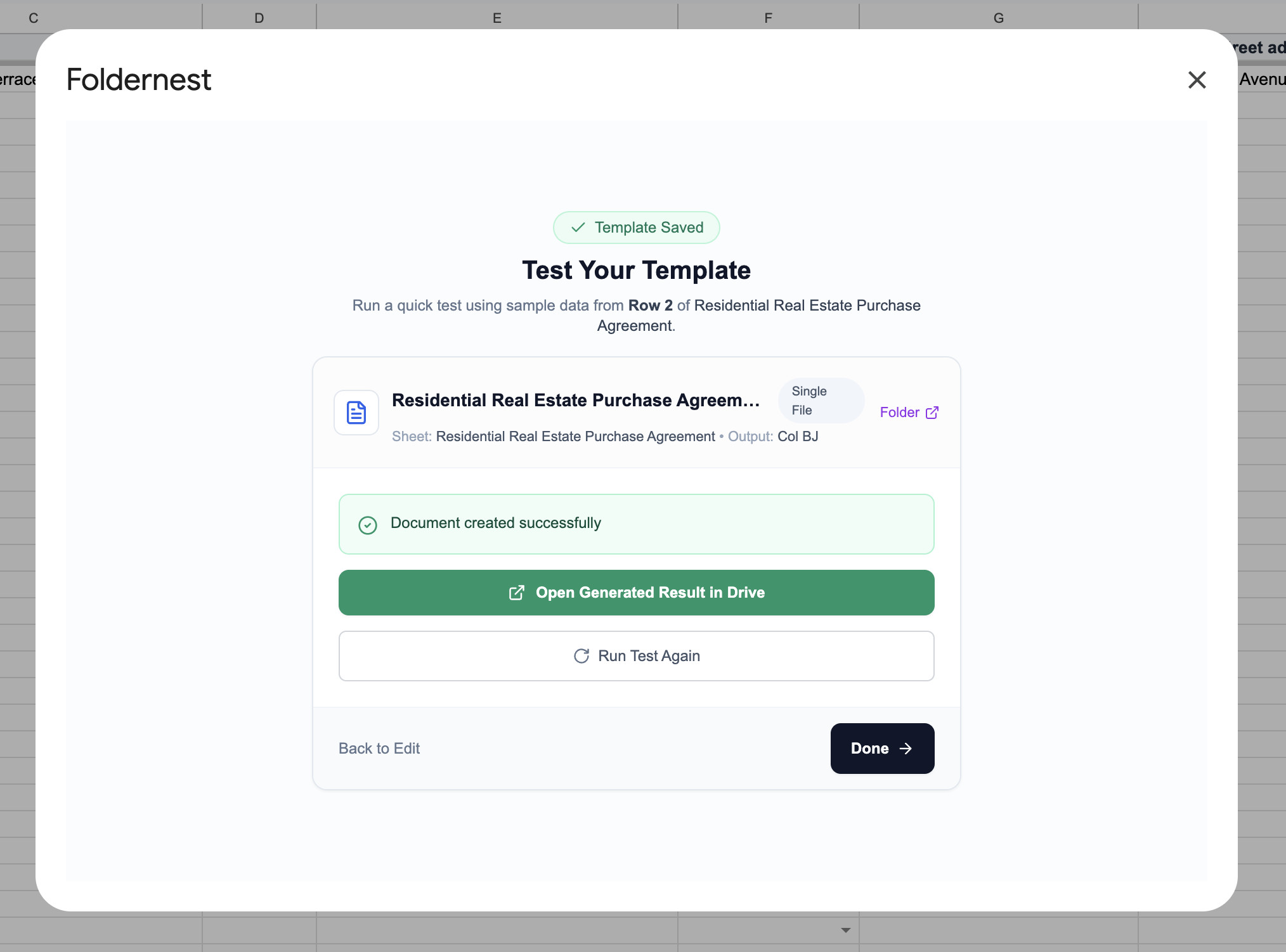
- Click Open Document to inspect the compiled Google Doc.
- Click Open Folder to view the destination folder in Google Drive.
- Click Back to Automations to view your active workflow dashboard.
Step 11: Manage & Run Automations from the Dashboard
In the Foldernest dashboard under My Automations, your new Residential Real Estate Purchase Agreement workflow appears with full configuration telemetry:
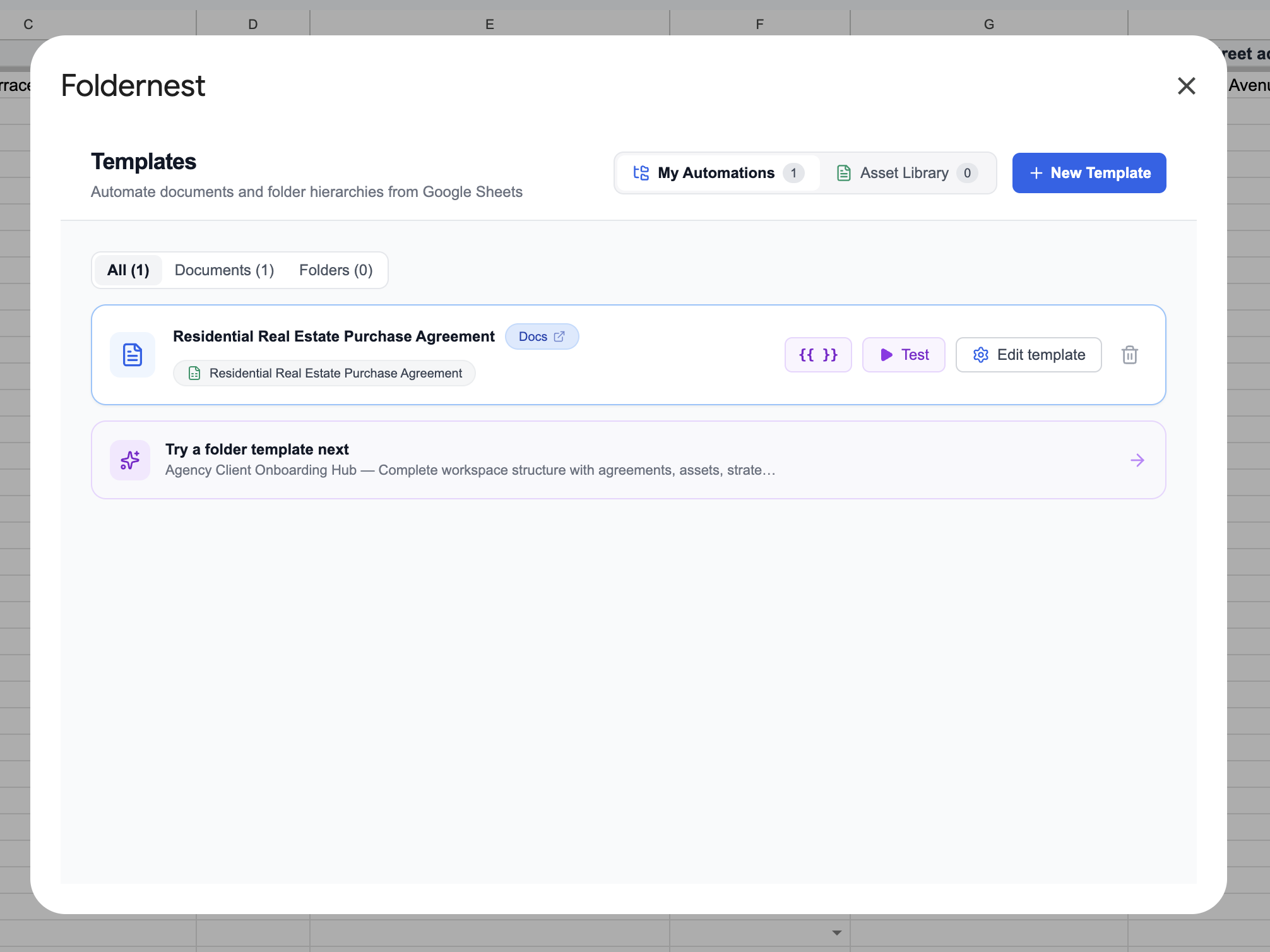
The automation card features dedicated quick-access badges: click the Docs badge to open and edit your Master Template in a new tab, click Residential Real Estate Purchase Agreement to jump straight to your source spreadsheet tab, or click Run to execute the automation on any row.
Step 12: Review the Generated Purchase Agreement in Google Docs
Open the generated Google Doc (`Purchase_Agreement_Jonathan Miller_1042 Ocean Avenue, Santa Monica, CA 90403`). Notice the flawless execution of both dynamic values and conditional logic:
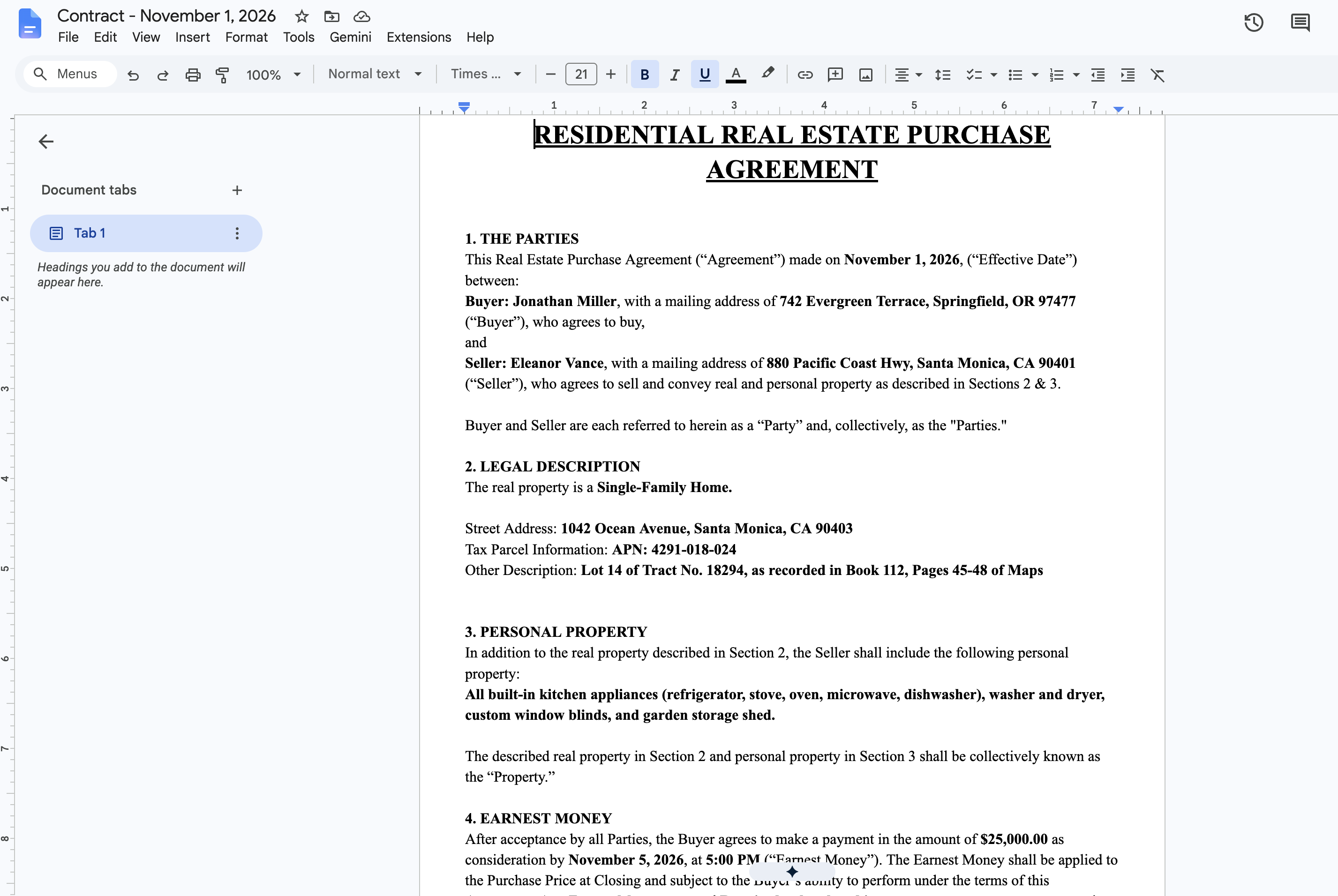
- Legal Accuracy: Buyer (*Jonathan Miller*) and Seller (*Eleanor Vance*) addresses, Santa Monica APN parcel identification, and property descriptions are populated with zero typos.
- Financial Terms: Purchase price (*$1,250,000.00* and *One Million Two Hundred Fifty Thousand* in words) and earnest money (*$25,000.00*) match your spreadsheet calculations to the penny.
- Conditional Elegance: Bank financing provisions (Conventional Loan) appear cleanly, while cash offer verification clauses are seamlessly suppressed without leaving blank lines.
- Contingency & Closing Specifications: Title company (*First American Title Insurance Company*), closing schedule, inspection resolution periods, appraisal contingency terms, and signature blocks are ready for immediate review and e-signature routing.
Step 13: View the Google Sheets Log with Smart Chips
Switch back to your Google Sheet. Look at Column BL (Generated File URL) for Row 2:
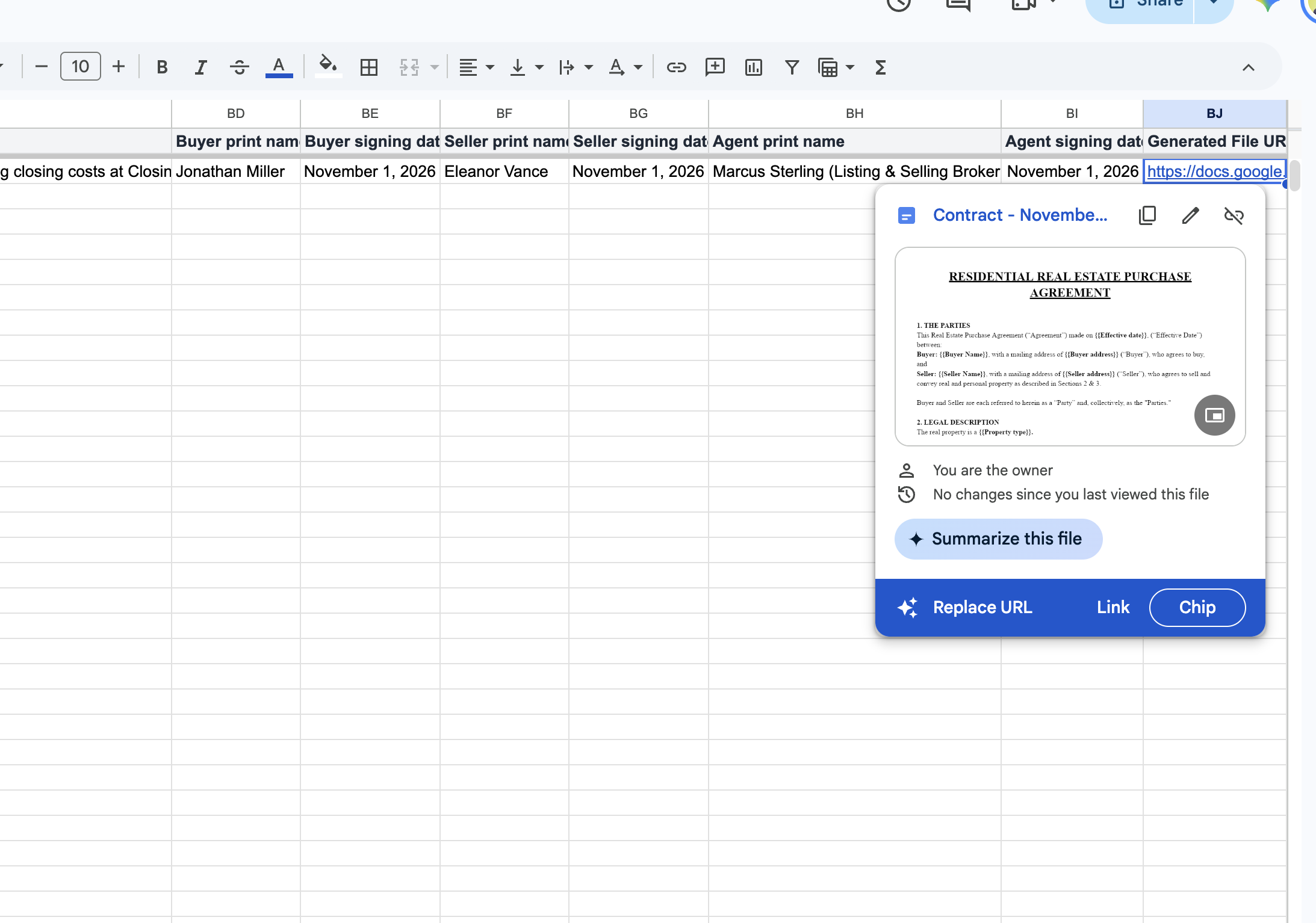
Foldernest automatically writes the generated Google Doc URL into Column BL. In Google Sheets, this URL renders with a native Google Drive Smart Chip, displaying the document icon, file title, and hover preview. Transaction coordinators can open the contract or verify completion without ever leaving the spreadsheet.
Deep Dive: Real Estate Contingency & Disclosure Management
Residential transactions are notoriously complex due to conditional statutory requirements and negotiable buyer protections. Even minor drafting inconsistencies can lead to escrow litigation or failed transactions. Foldernest handles conditional clauses with mathematical precision:
- Bank Financing vs. All Cash Offers: In a bank-financed transaction, the contract activates formal loan application deadlines, loan commitment periods, and termination notice requirements. In an all-cash offer, these clauses disappear, replaced by cash verification letter deadlines.
- Earnest Money Trust & Escrow Compliance: Whether earnest money is deposited with a neutral closing attorney, title company, or brokerage trust account, the agreement reflects the selected *Earnest money trust account* policy automatically.
- Appraisal Contingency Flexibility: For competitive bidding where buyers waive appraisal contingencies, Foldernest cleanly suppresses appraisal renegotiation periods. For standard contingencies, it specifies the exact negotiation window.
- Sale of Prior Property Contingencies: When a buyer must sell their existing home to fund the purchase, the agreement dynamically inserts contingent property addresses and required sale timeframes. If not contingent, the clause is completely omitted.
- Statutory Disclosures & Addenda Schedules: Automatically incorporates listed disclosures (Lead-Based Paint, Seller Property Questionnaire, Natural Hazards) based on the *Disclosures option* selection.
Manual Purchase Agreement Drafting vs. Automated with Foldernest
| Workflow Dimension | Manual Copy-Paste | Automated with Foldernest |
|---|---|---|
| Drafting Time per Offer | 45–90 minutes per contract | Under 3 seconds per row |
| Risk of Data Bleed & Privacy Leaks | High (residual buyer/seller names & old prices) | Zero (compiled fresh from validated sheet rows) |
| Contingency Handling (Financing, Appraisal) | Manual edits prone to contradictory clauses | Automated via conditional <<If: ...>> blocks |
| Google Drive File Organization | Scattered documents, inconsistent naming | Structured dynamic naming in designated Drive folders |
| Auditability & Escrow Tracking | Lost links across email threads | Direct link logged in Column BL with Smart Chips |
| Scalability for Brokerages & Investors | Linear workload that delays competitive offers | Generate 1, 10, or 50 purchase contracts in minutes |
Advanced Transaction Coordinator & Brokerage Strategies
Pro Tip
Accelerate Offer Turnaround in Bidding Wars: When presenting competitive purchase offers, time is critical. Connecting your Google Sheets buyer pipeline to Foldernest lets agents draft and submit standardized, attorney-grade purchase agreements within minutes of receiving buyer approval.
- Standardize Numeric & Date Formats: Format purchase prices as standard currency (`$1,250,000.00`) and closing dates as clear text (`November 30, 2026` or `2026-11-30`) to ensure immaculate legal formatting.
- Deal Pipeline Status Tracking: Add workflow tracking columns adjacent to Column BL—such as *Offer Status* (*Drafted*, *Submitted*, *Under Review*, *Accepted*), *Earnest Money Deposited*, and *Escrow Number*.
- Integrate with Folder Hierarchy Automation: Combine your purchase agreement automation with Foldernest Folder Templates to instantly create organized transaction dossiers (Disclosures, Title Reports, Inspection Reports, Loan Documents) for every property.
- Streamlined E-Signature Dispatch: Download the generated Google Doc as a PDF or forward it directly into e-signature platforms (DocuSign, HelloSign, PandaDoc, Adobe Sign) for seller and buyer execution.
Frequently Asked Questions (FAQ)
Is a purchase agreement generated via Foldernest legally binding?
Yes. Foldernest generates genuine Google Docs agreements based on your approved master template. Once signed by buyer, seller, and brokers (either wet ink or via an ESIGN/UETA compliant e-signature service like DocuSign or Adobe Sign), the agreement is as legally binding and enforceable as any contract drafted manually.
Can I customize the clauses or use my brokerage's proprietary contract?
Absolutely. While Foldernest supplies a comprehensive pre-built Residential Real Estate Purchase Agreement starter, you can automate any existing Google Doc contract. Simply choose Start Blank in Foldernest, select your brokerage's standard document, and place `{{Column Name}}` placeholders and `<<If: ...>>` conditional tags wherever spreadsheet variables belong.
How does Foldernest suppress non-applicable contingency clauses?
Foldernest uses conditional syntax: `<<If: (condition)>>clause content<<EndIf>>`. During document compilation, if a condition evaluates to false (such as when an offer does not have a prior home sale contingency), Foldernest removes the clause, numbering, and line breaks completely, preventing awkward gaps in your contract.
What happens if our transaction sheet headers are edited or rearranged?
You do not need to rebuild your automation. Click the Detect / Refresh button in Step 2 of the Foldernest wizard. Foldernest re-analyzes your sheet headers, updates the Column BL link target if columns were shifted, and refreshes all variable markers immediately.
Does Foldernest preserve our brokerage branding, letterhead, and formatting?
Yes. Foldernest clones your master Google Doc using Google Drive APIs. All logos, custom header/footer styling, typography, paragraph spacing, legal tables, and page margins remain 100% true to your original master template.
Can we batch-generate purchase contracts for multiple properties or investors?
Yes. Select multiple rows in your Google Sheet and click Run for Selected Rows. Foldernest compiles individual agreements for each deal, logs each direct Google Doc URL in Column BL, and archives all files in your destination Google Drive folder.
Start Automating Real Estate Purchase Agreements Today
Manual contract drafting slows down transaction velocity, burns valuable agent hours, and introduces costly clerical errors. By linking your Google Sheets deal pipeline with dynamic, conditional Google Docs templates in Foldernest, you can generate impeccable purchase agreements in seconds and close deals faster.
Ready to streamline your real estate transactions? Install Foldernest from the Google Workspace Marketplace and generate your first automated residential purchase agreement today.